Collective Trigger
The Collective Trigger functionality is used to trigger a new flow based on certain conditions. It collects messages from flows (triggering flows) in the platform and groups them by an identifier to reach those conditions. This identifier is called the Correlation ID.
When a certain condition is reached (e.g., a number of messages collected per Correlation ID) the service will handle the start of a flow (a result flow) processing with the arguments passed on the Collective Trigger messages.
These messages can be sent by a rule being executed in a flow by calling the function send_collective_trigger. This function can set two main types of parameters:
- Flow execution parameters: the parameters for the flow execution, e.g. the flow design id, the flow properties, etc.
- Collective Trigger handling: conditions on how to handle the messages for a certain Correlation ID, .e.g.: the number of expected messages, the deadline expected for the desired amount of messages, etc.
The flow properties of the messages received are combined (merged) per Correlation ID and shared with the result flow.
There are certain conditions that can be set for handling the Collective Trigger, they can set waiting windows for messages of the same Correlation ID in two different ways:
- The deadline: a timeout window which starts after the first message is received and indicates that a specific number of messages for the same Correlation ID is to be expected before this time is reached.
- The timeout in between messages: a timeout window that starts with each message and indicates how long it is expected for a new message of the same Correlation ID to arrive.
When a condition of the above is expired and a message corresponding to that same Correlation ID is received, then we define these messages as Late Data. We can configure several possible behaviors to handle this Late Data:
- Discard: simply discard the message.
- Trigger flow combining all data again: trigger the message again with the combination of all flow properties.
- Trigger flow with the new message: trigger the message again with the new message only.
- Restart the window: restart the waiting window.
Important note: for any given Correlation ID, the maximum amount of time for Late Data behavior after the deadline has
expired is four times the deadline delta (i.e., the time between the first message and the deadline.)
The following diagram shows an example of how the Collective Trigger functionality works and how we represent this behavior in our platform.
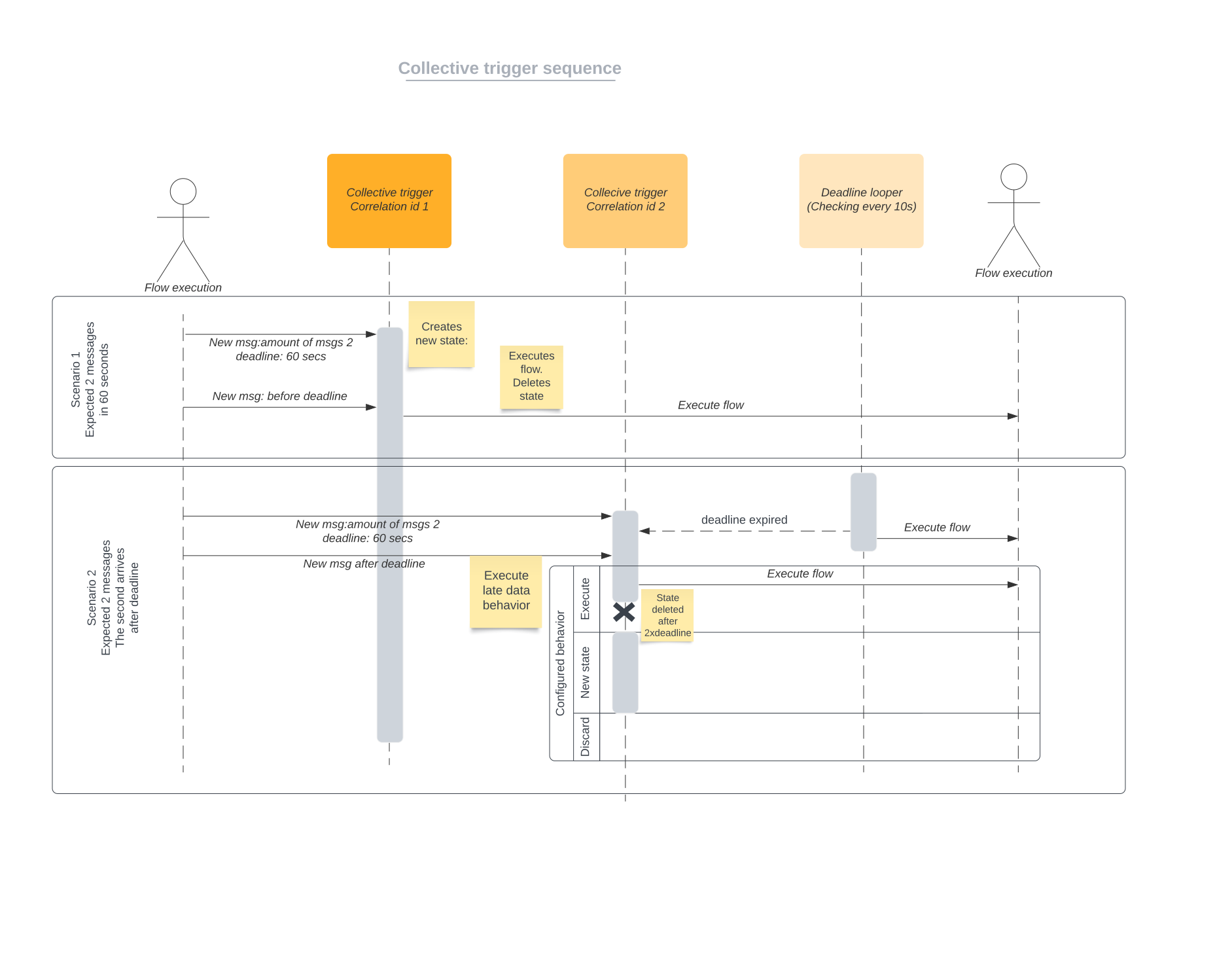
The collective trigger functionality is only accessible from the rule framework functions and the interface is described in Rule Framework Functions
Limits of the functionality
This section outlines the limits of the functionality.
- Correlation ID: The Correlation ID length should not exceed 1024 characters.
- Deadline limits: The deadline will never exceed 24 hours after the first message is arrived. An attempt to configure a larger deadline will result in an error in the triggering flow.
- Timeout limits: The timeout in between messages will never exceed 24 hours after the first message is arrived. An attempt to configure a larger deadline will result in an error in the triggering flow.
- Maximum flow rate: The processing of parallel messages allows for up to 10000 messages to be sent in a short period of time (less than a minute). The timeout in between messages for the same correlation id depends on the number of expected messages. With a high rate (>100 messages) and a high number of messages per correlation id (>10 messages), the timeout should be minimum
10 minutes. The deadline should also be adjusted accordingly (always higher than the timeout).